We are proud to announce the public release of Sentinowl , the missing odometer for your storage drives.
You probably already know that SSDs and hard disk drives (HDDs) have specs like capacity and read/write speeds. For example, this Samsung 990 Pro SSD comes in 1 to 4 TB versions, with up to 7,450 MB/s reads and 6,900 MB/s writes.
What many people don’t realize is that modern SSDs and HDDs also have manufacturer-rated usage limits that decline over time as you write data. This is why sudden drive failures and data loss often seem to strike without warning. In reality, your drives were likely showing signs of degradation long before they failed, but most people simply have no visibility into these indicators.
Beyond SMART Snapshots #
Nearly all modern drives use SMART (Self-Monitoring, Analysis and Reporting Technology) . This system tracks critical health statistics like power-on hours, reallocated sectors, remaining spare capacity, total data written, and more.
Most monitoring tools only give you a static snapshot of these values. Sentinowl takes a fundamentally different approach by recording this data over time and visualizing trends, making it immediately clear when problems start to develop. This transforms raw SMART data into actionable insights, so you can make proactive decisions about drive replacement and data preservation.
This is what the raw output of smartctl looks like:
SMART Attributes Data Structure revision number: 16
Vendor Specific SMART Attributes with Thresholds:
ID# ATTRIBUTE_NAME          FLAGS    VALUE WORST THRESH FAIL RAW_VALUE
  1 Raw_Read_Error_Rate     POSR-K   100   100   000    -    0
  5 Reallocate_NAND_Blk_Cnt PO--CK   100   100   000    -    0
  9 Power_On_Hours          -O--CK   100   100   000    -    19647
...
194 Temperature_Celsius     -O---K   071   051   000    -    29 (Min/Max 9/49)
199 UDMA_CRC_Error_Count    -O--CK   100   100   000    -    0
202 Percent_Lifetime_Remain P---CK   091   091   000    -    9
206 Write_Error_Rate        -OSR--   100   100   000    -    0
246 Total_LBAs_Written      -O--CK   100   100   000    -    31631962071
247 Host_Program_Page_Count -O--CK   100   100   000    -    1000356675
248 FTL_Program_Page_Count  -O--CK   100   100   000    -    3582053284
Versus what you get with Sentinowl:
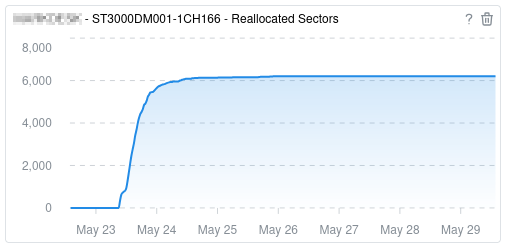
Sentinowl vs. Other Tools #
Most people either skip drive monitoring entirely or rely on tools like:
- CrystalDiskInfo - A popular Windows tool that reads SMART data and offers some local time-series graphs, but is tied to a single machine with no centralized view.
- smartctl / smartmontools - Extremely powerful, but command-line only. You have to build your own ingestion pipelines and dashboards to see trends.
- Vendor-specific tools (Samsung Magician, WD Dashboard, etc.) - Provide detailed insights, but only for that brand’s drives on that specific machine.
- Enterprise monitoring stacks (Prometheus+Grafana, Zabbix, etc.) - Highly flexible and powerful, but require substantial setup. You have to maintain databases, dashboards, and alerting rules. Often unnecessary and time-consuming for small-scale setups.
How Sentinowl Stands Apart #
Sentinowl fills these gaps by offering:
- Historical tracking - Turns raw health snapshots into clear long-term trends.
- A unified, web-accessible console - See all your drives, across all your machines, in one place from any device.
- No complex setup - No database to manage, no intricate configuration. Sentinowl works immediately with minimal effort.
- Lightweight - Designed to run quietly in the background without impacting your system’s performance.
- Cross-platform - Available on Windows and macOS, with Linux support coming soon.
- Alerting - Set up custom rules to get notifications as soon as something changes.

👉 Get Sentinowl and start tracking your system health today!
P.S. Happy Canada Day 🇨🇦🎉